Eldercare: stay home longer Part 2
The main obstacle in the sales process is going to be the conversation between the caretaker and the elderly person about putting this picture frame in their house. There is work to be done here, but hopefully doing a test run of 5-10 of these we will learn more about the specific obstacles. For instance, I need to have a conversation with my mother about putting this in her house, the benefits and how it is non-invasive.
Work continues.. the parts arrived! Here is what I ordered from Digikey:
- 1738-SEN0623-ND mmWave DF Robot SEN0623
- 1738-SEN0610-ND mmWave DF Robot SEN0610
- 1738-DFR1117-ND BEETLE ESP32 C6 MINI DEV BOARD
- 1528-5933-ND ADAFRUIT ESP32-C6 FEATHER - STEM
- 1528-4494-ND BAROMETRIC PRESSURE / ALTITITUDE
- 1965-ESP32-S3-DEVKITC-1-N8R8-ND ESP32-S3-WROOM-1-N8R8 DEV BRD
I got the Espressive DEVKITC because it is a beast of a board and the same price as the Adafruit Feather. I really like that it has a couple of serial ports, but I am nervious about it's arduino board support. Adafruit does a good job of testing their boards and a lot of people buy them and use them with the arduino development environment.
I'll start by bringing up the Adafruit ESP32-C6 Rev 2 Feather. First I solder on the pinouts. Then connect 5v on the SEN0623 to the BAT output, though I measure it first to be certain.
I would normally connect with jumper cables, but after a thorough search of my lab bench and all my other stashaway places for electronics in the house I couldn't find any. So I soldered it together old school on a perf board. I didn't even have headers so this might be difficult to undo, but I like how compact it is to potentially fit behind a picture frame:
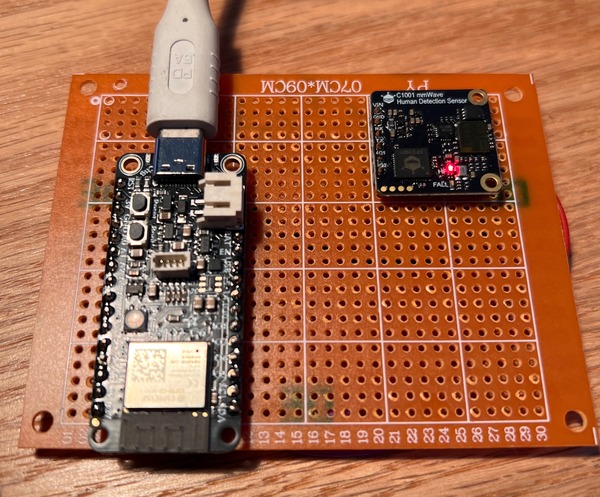
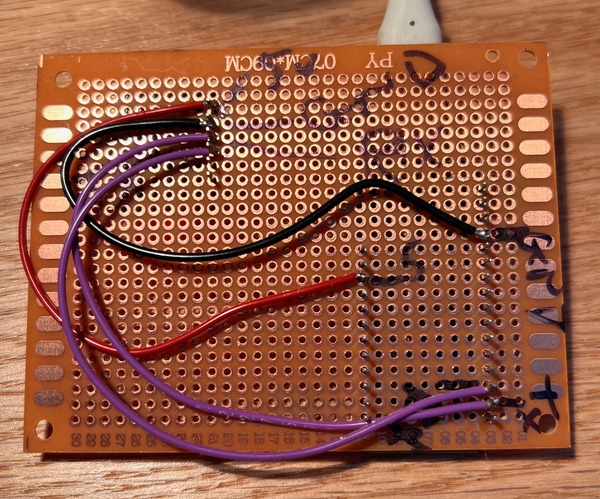
I connect 5v on mmWave to Vbus (USB). This measures at 5.2V on the multimeter. RX+TX on the mmWave go to TX+RX (always flip) on the ESP, pins 17+16.
I had some trouble getting the ESP32-C6 to communicate via serial, and I got it running by enabling "USB CDC On Boot: Enabled". I put together a simple uart in -> uart out to see the raw data but it's binary, so I downloaded DFRobot_HumanDetection library and installed it.
It works nicely, but the demo code isn't really doing that much for me. It shows a few parameters like if it thinks someone is present, but it's sent back in a way it's hard to test. I figure I might as well wire this up properly.
I get claude code CLI involved. I tell it to find all the parameters in the DFRobot_HumanDetection library that we can parse and to use the ESPSupabase library to upload it to supabase. It creates the SQL command to run in the Supabase SQL Editor to create the single table. I simply follow the instructions claude has laid out, create the table, copy the SupaBase Project URL and anon/public key, add my wifi SSID and password, and have it create a web interface that shows all the realtime information. It didn't work the first time, but then it found a jquery error, fixed it, and now I had a user interface showing me real time data from the ESP32. This meant I can power the ESP (which we will call the moveOmeter from now on) with a USB wall wart and mount it anywhere and see the real time output on my laptop!
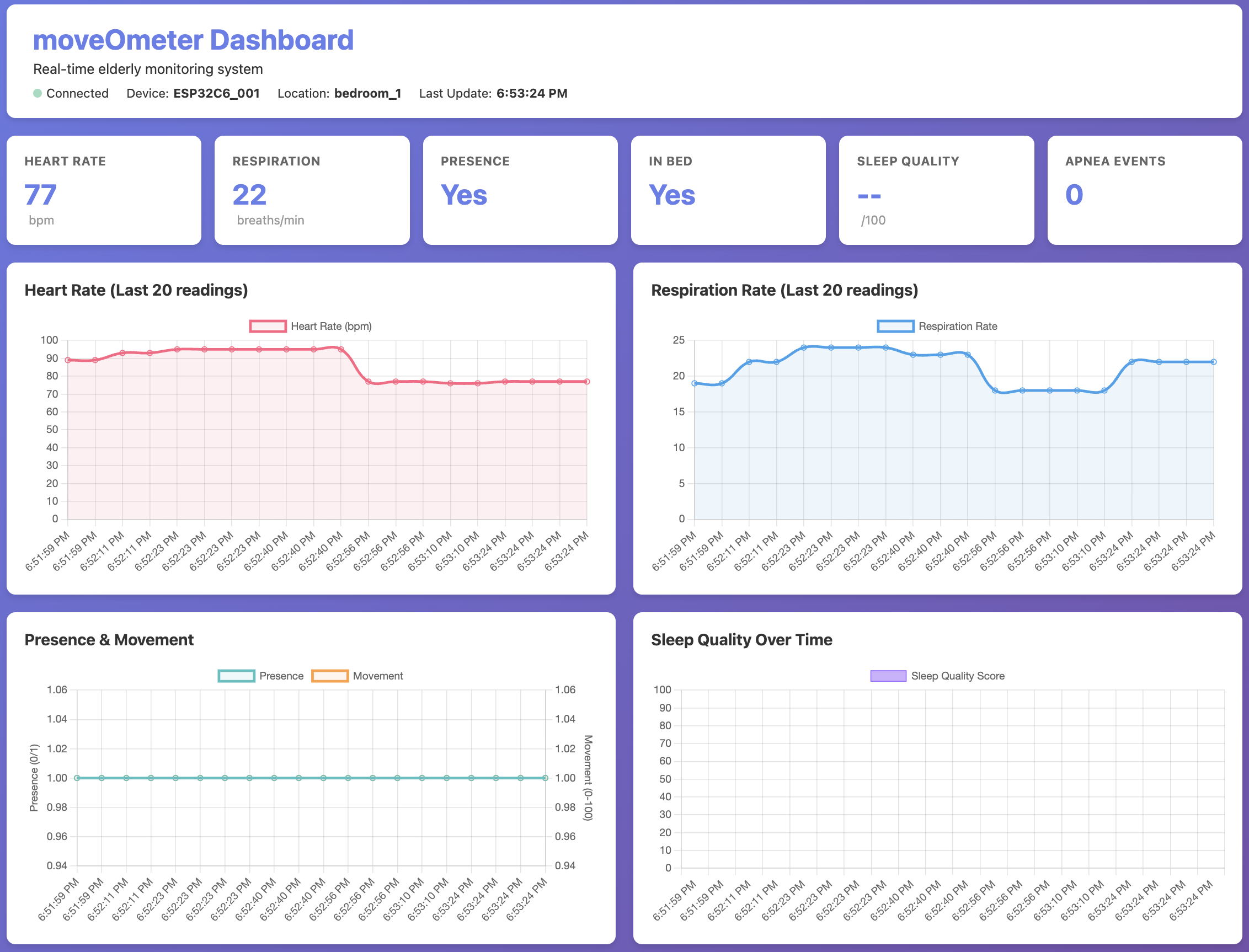
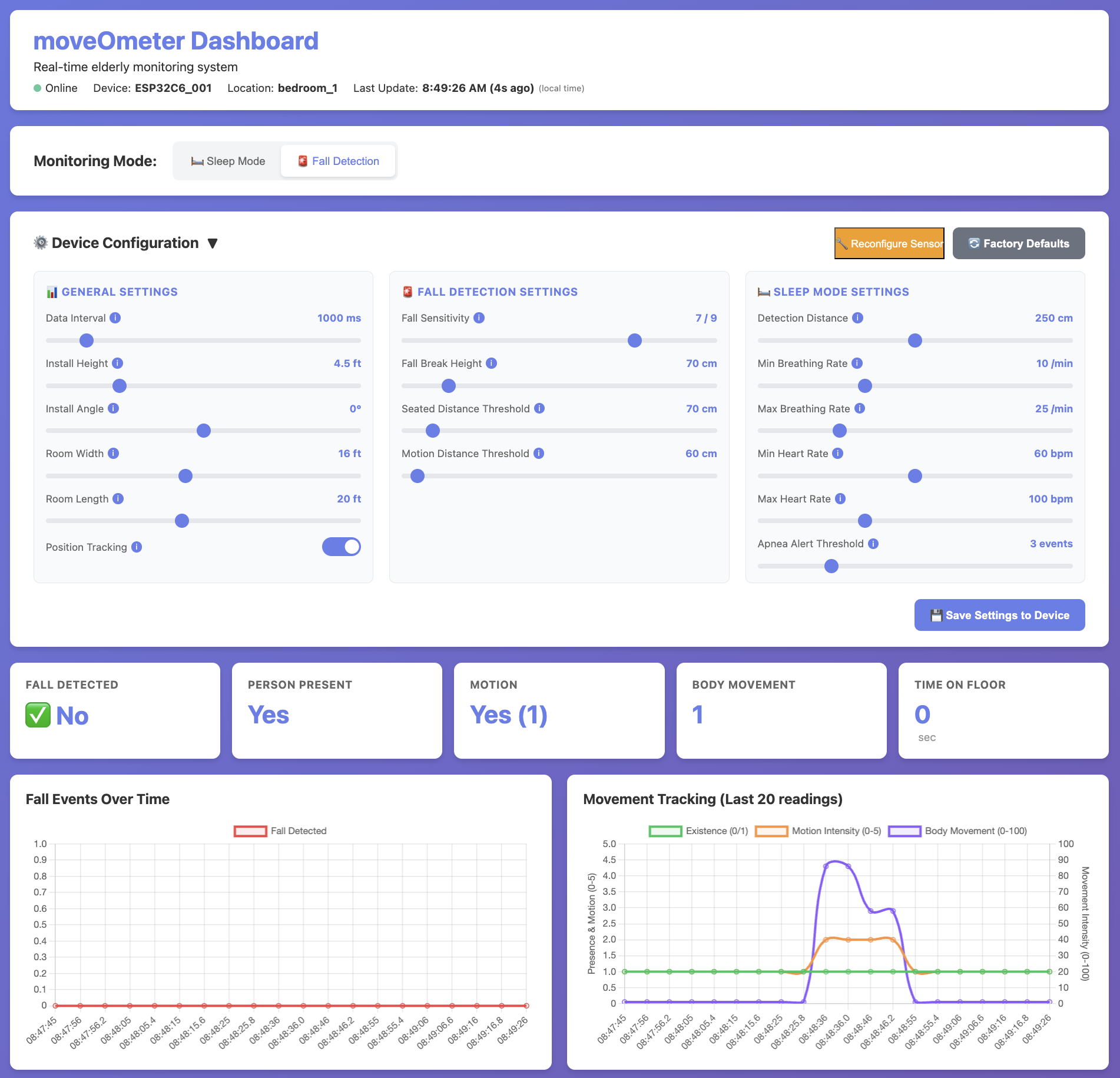
This was all in 'sleep' mode. I asked claude to add the parameters for 'fall' mode. The look like this:
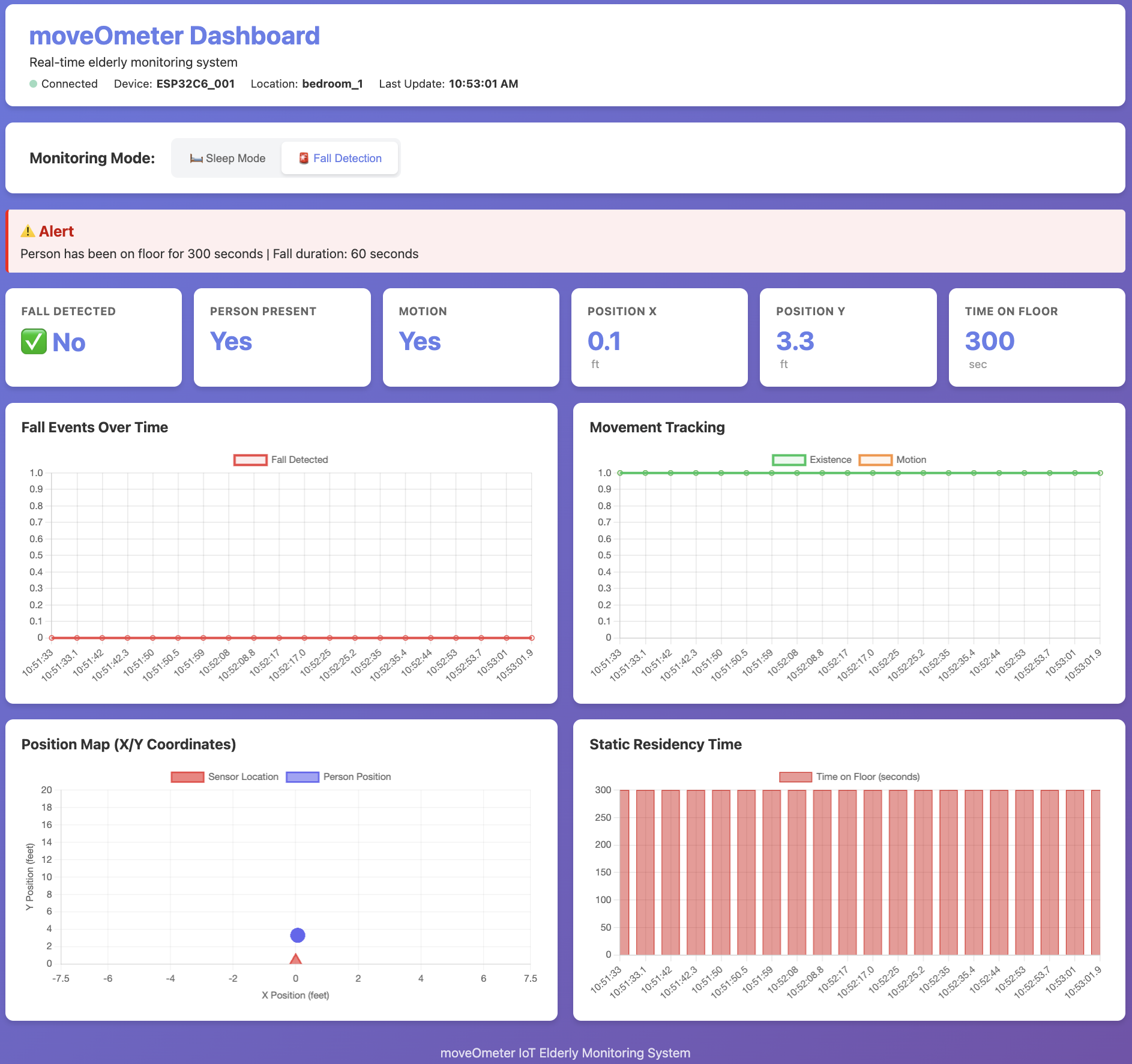
The ALERT I am looking into. Not everything was perfect of course, but in this crazy world this was the starting point I begin iterating with AI on, though I already told it to show the sensor in the middle of the wall and make the axis absolute so it would be easier to see relative positions.
1. Accurate time
I am paranoid about time in embedded systems. It is especially important in audio projects that use directional listening like the in 3D Acoustic Telescope I worked on at WHOI. As I suspected, Claude just used the timestamp from the database for the time it received it. But that is not when the action happened.. so I asked claude to sync to a NTP server to ensure an accurate local clock, and add a timestamp to the database and use that to graph from (sorry for the quote block):
I guess I am wondering what is the timestamp? is it the time the data was received by supabase? I want to be very certain of the time of each reading. recommend an arduino time keeper that can automatically sync to a couple of time servers every 5-10 minutes to make sure we have accurate time. Then add that timestamp to the supabase table and to the data sent to supabase. that timestamp we will call 'local_moveOMeterTime' (or something obvious like that) and we will use that to graph and analyze.
It responded nicely, did all of that, and it worked the first time. I truly can't believe it. That one feature, which the system could potentially work without but is something I like to have in all my projects, accurate time, and logging of all the raw data, would have taken me hours to get right.. at least 2-3, and that is if everything went smoothly. While it will take a lot of slow iterating, testing, and validating using clause to 100% generate all of the code is a functional way to build something quicker than I could on my own. I don't know all the server stuff very well, I could brute force my way through it with the help of stack overflow, and before stack overflow really was limited. Now I know enough to direct claude to built it the way I like things done, even though I don't know exactly how to implement them.
2. Issue: Stuck values not changing
The values stopped changing. I asked Claude and it said to do hard reboot, power off for 10 seconds. I did and it worked. But that is unsettling. There is a chance I am testing it and things got confused, but there is also a chance this sensor can't run for 1-many hours on it's own without being reset. To be safe I asked it to draw up a schematic for a way to power the mmWave sensor on/off.
3. Movement History
While testing I was moving about, but then I wasn't able to see the dot. A bit of history here would be nice, so I asked claude to show prior movements as light lines.
I also changed the name at the bottom from "moveOmeter IoT Elderly Monitoring System" to "moveOmeter Eldercare"
4. Server side moveOmeter settings
I tell claude to add settings. I want each moveOmeter to have an entry in a table that has all of it's settings. These can be set from the web interface or future phone app. The moveOmeter checks settings and eventually will check a flag that tells it something changed so it knows to reload the settings.
I like user interfaces that are 'real time', so if one user changes something, the other user sees that change instantly, possibly even with a little broadcast note at the top of the page. This should work between platforms as well, so a change in a phone app shows up in a web page almost real time.
5. x and y location don't really work well
To get all the values in FALL mode it takes about 8 seconds.. which is really slow. I was thinking I would be able to get real time readings but it seems that is not possible, another reason why I should buy the $500 development kit to get into lower level access to the chip itself. But this is what we have for now, and it does seem capable of detecting motion, so we just might have a working MVP (minimum viable product).
This is where we are now.. I have made all of the tuning options sliders above while I am getting to know the sensor and it's parameters, and added a 1 hour history window. I'll add a 24 hour window below that.
Issue: Nonresponsive after about 10 minutes
I have noticed an ongoing issue: after about 10 minutes it stops working. I move in front of it and it does not register anything. There is a possibility that I don't have sufficient power, or that the power isn't well regulated. This is the most likely issue, and to fix it I'll likely
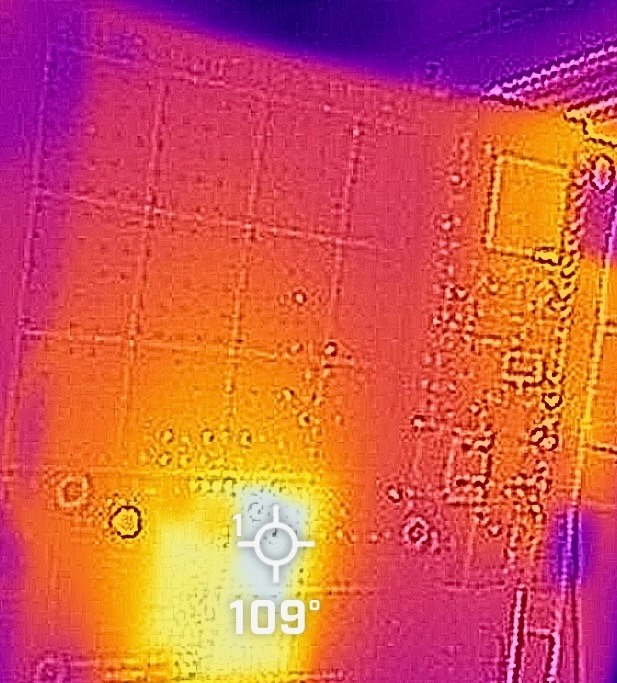
I break out my FLIR One attachment for my iPhone. The temperature of the chip is 109° degrees Fahrenheit (47.8°C)which is getting pretty toasty, but not out of the ordinary.
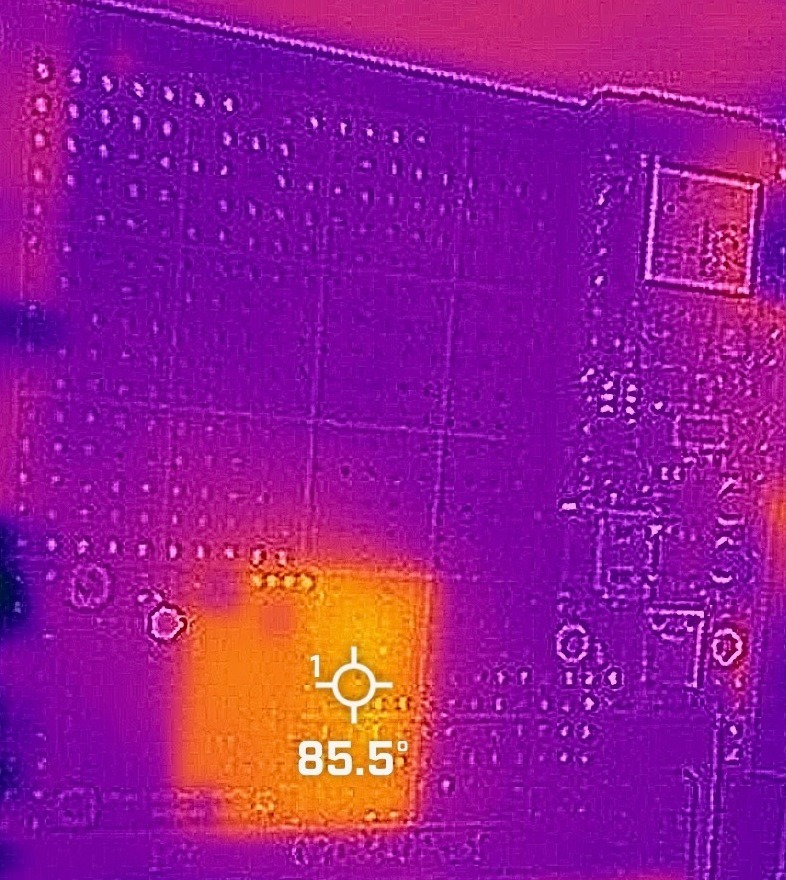
I'll try putting a fan on it to see if that does anything - then I'll know if the problem is heat or voltage (and it could be both). If it is just heat the a heatsink or a tiny bit of convection could fix it.
With the fan on it seems to have worked a bit better, but only for 15 minutes.. here in the 1 hour graph we see activity stop when it hasn't. (kids are playing in front of it)
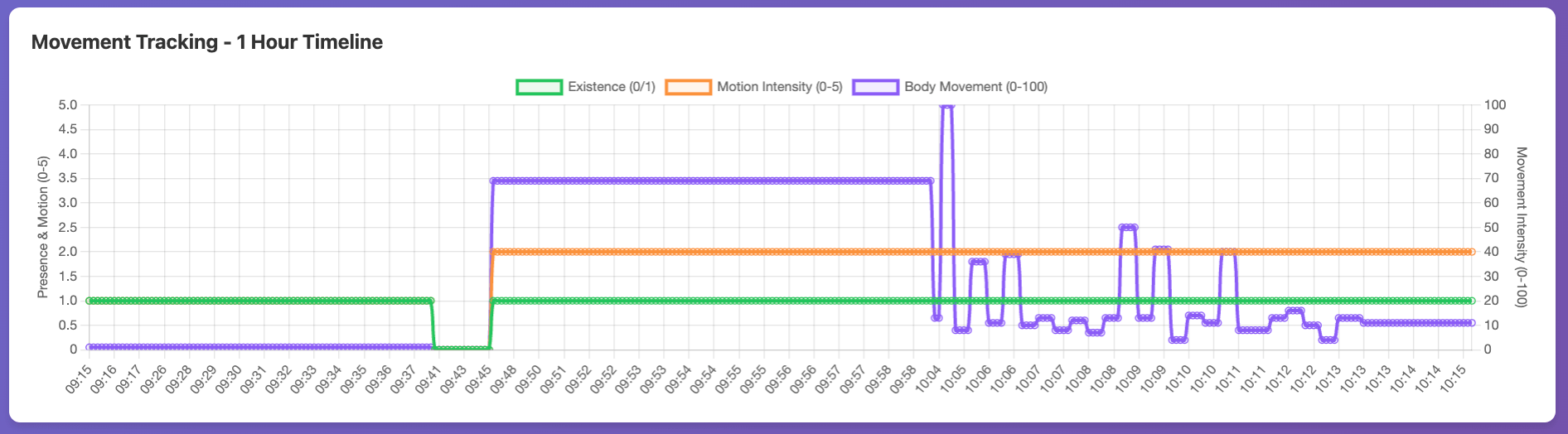
But when I leave it on it picked up again and seemed to be quite responsive and functioning nicely for about 15 minutes until it flatlines:
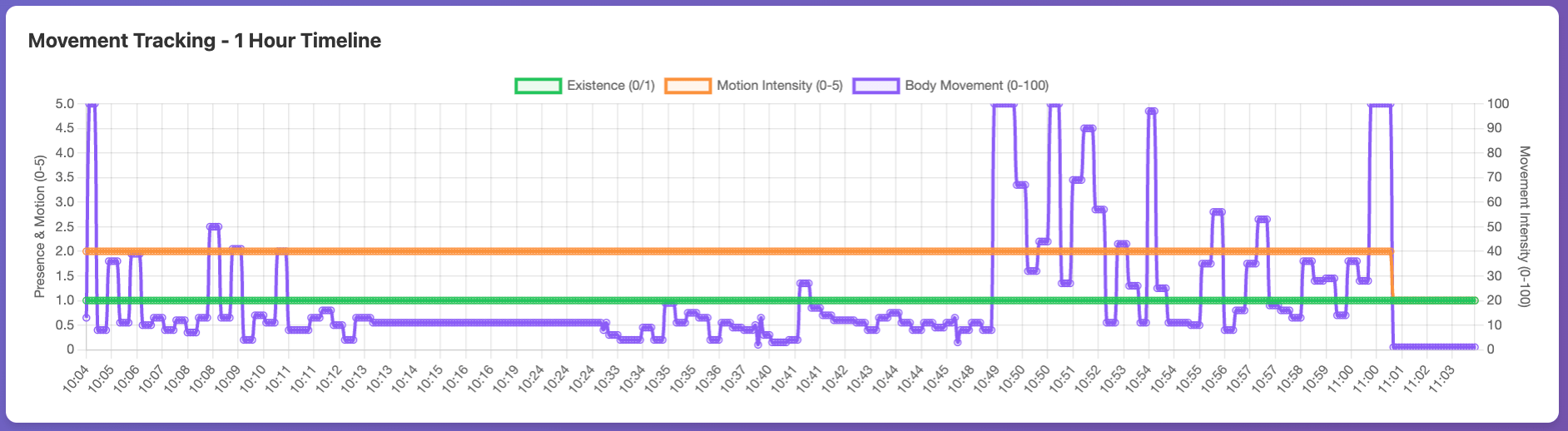
When I look at the serial monitor it is sending back flat numbers as well, which confirms it is likely the device itself.
I'll try a reboot at 11:06am where I remove USB C power, wait for 20 seconds, then plug it back in. Even after the reboot it is showing some movement but mostly flatlining.
At 11:20 I turned the fan from LOW to HIGH. My next step is to add a better power supply - there might be transient currents that are causing it to brown-out. However with the higher fan speed on the chip it seems to be running longer:
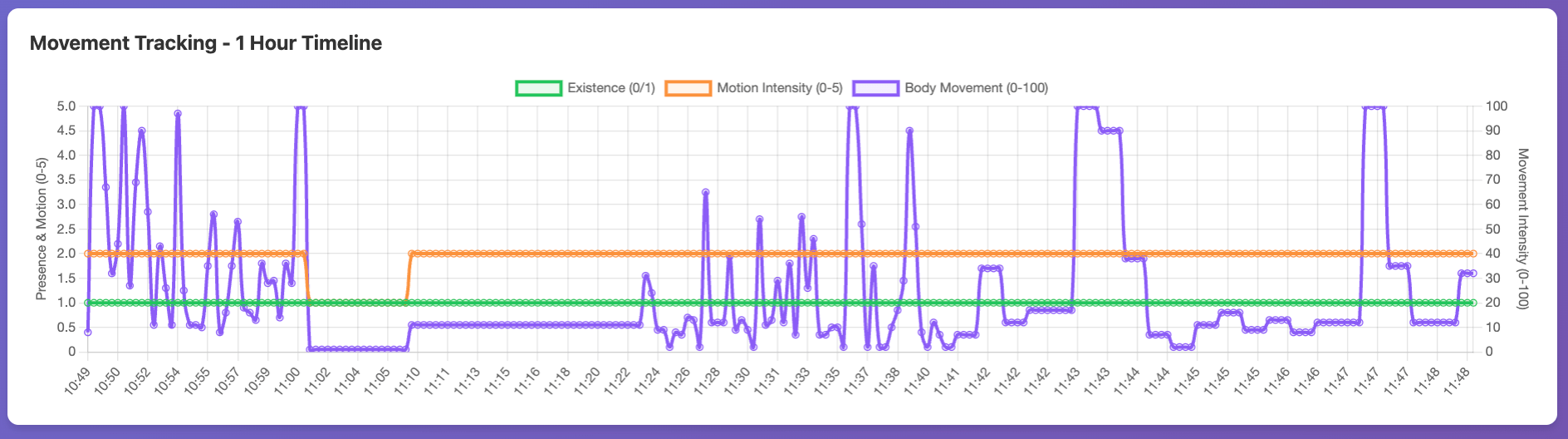
I'd rather this not run with a fan, but a slow large muffin fan could run silently and with a heatsink stuck on could mitigate heat nicely. But it stopped working again. This time it ran for 1 hour and 15 minutes (about):
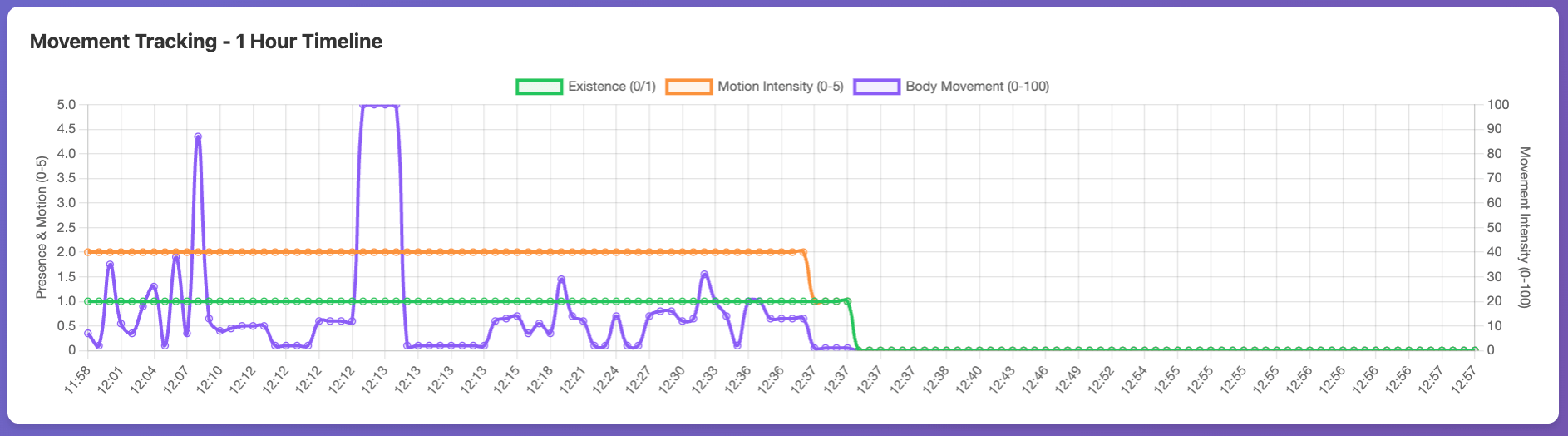
The fan has been on high, so we have ample cooling, but all the values are 0, even when I make a lot of motion in front of it. Throughout the day it continues to work and then not work, sometimes even on power up.
I am at the end of the day. Overall I am pleased with the functionality of it when it is working, and will focus tomorrow on figuring out why it isn't working.